Jump to content
View in the app

A better way to browse. Learn more.

Smoke's & Jack's

A full-screen app on your home screen with push notifications, badges and more.

To install this app on iOS and iPadOS
  1. Tap the Share icon in Safari
  2. Scroll the menu and tap Add to Home Screen.
  3. Tap Add in the top-right corner.
To install this app on Android
  1. Tap the 3-dot menu (⋮) in the top-right corner of the browser.
  2. Tap Add to Home screen or Install app.
  3. Confirm by tapping Install.
A group blog by Arendusmeeskond in Smoke's & Jack's
  • Entries

    8
  • Comments

    0
  • Views

    14720

Contributors to this blog

About this blog

Entries in this blog

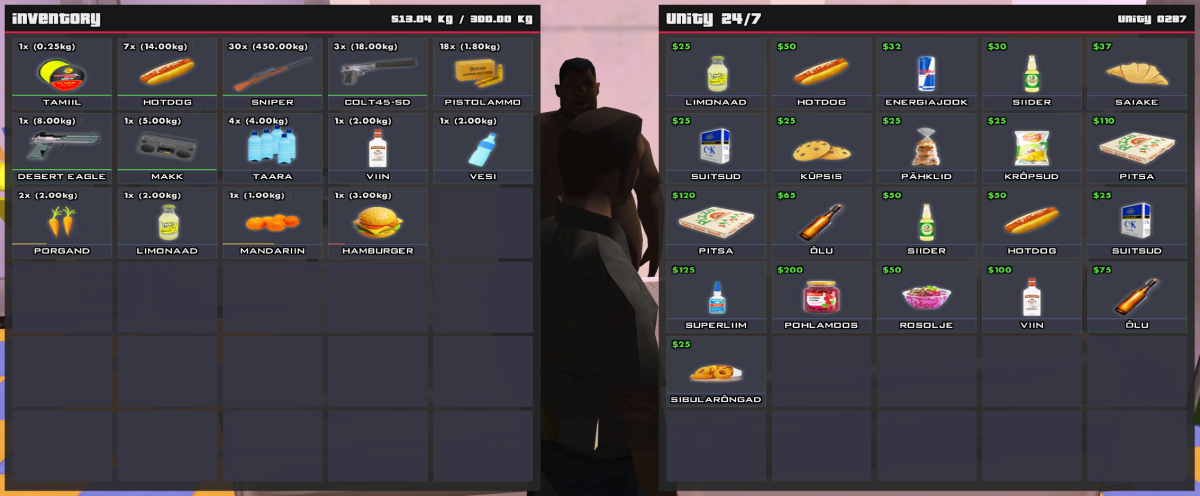
Server uuendatud Open.MP versioon v1.5.8.3079 peale. Välja on lastud uus Open.MP launcheri versioon 1.6.1. Server ADD: Uus TextDraw'idel põhinev inventory süsteem. (max 30slots). ADD: Sõidukitel on nüüd lisaks pagasnikutele võimalik asju pardatsokki panna (max 5 slots). (Pagasnikule saavad ligi ainult võtmetega isikud, pardatsokile kes iganes autos on.) CHANGE: Tulirelvad ei stacki enam inventorys. CHANGE: Reworkitud asjade mahaviskamine, vana prügikoti asemel tekib mahaviskamise kohta nüüdsest

Account

Navigation

Search

Configure browser push notifications

Chrome (Android)
  1. Tap the lock icon next to the address bar.
  2. Tap Permissions → Notifications.
  3. Adjust your preference.
Chrome (Desktop)
  1. Click the padlock icon in the address bar.
  2. Select Site settings.
  3. Find Notifications and adjust your preference.